Site icon Freelance Expert PrestaShop – WordPress – WooCommerce : Arnaud Merigeau

Tuto : personnaliser la page magasins dans PrestaShop

PrestaShop propose d’afficher une page avec la liste de tous les points de vente physique dont vous disposez.
Voyons voir comment personnaliser cette page magasins dans PrestaShop.

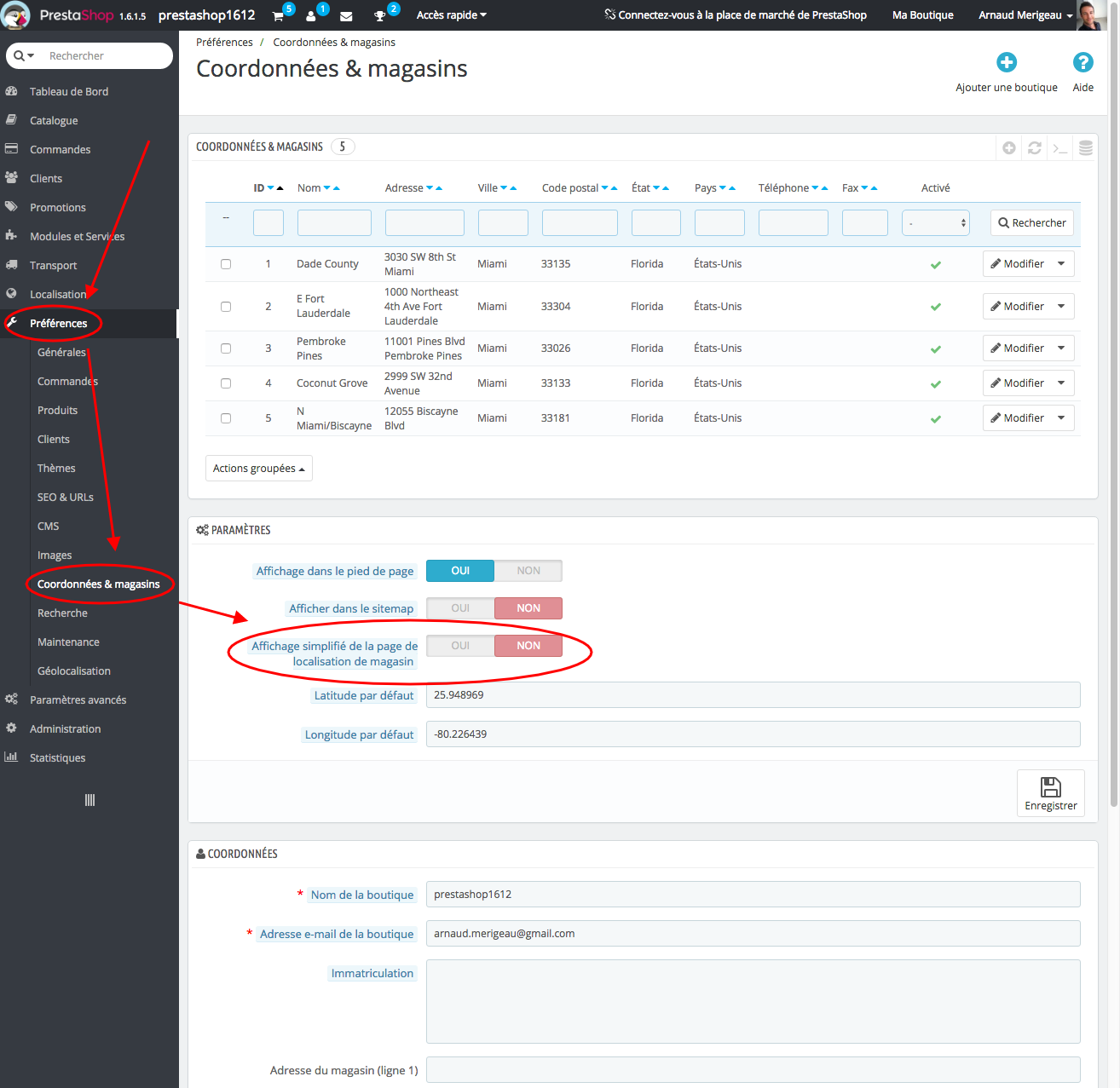
Constat : une page magasins dans PrestaShop assez limitée

Vous avez une option dans l’administration de PrestaShop qui permet d’affiche au choix :


C’est plutôt limité, notamment si on veut avoir les deux affichages.

Tuto : personnaliser la page magasins dans PrestaShop

[edit du 05/10/2017] Voici un tuto vidéo (qualité de son médiocre, veuillez m’en excuser) pour appliquer les modifications :

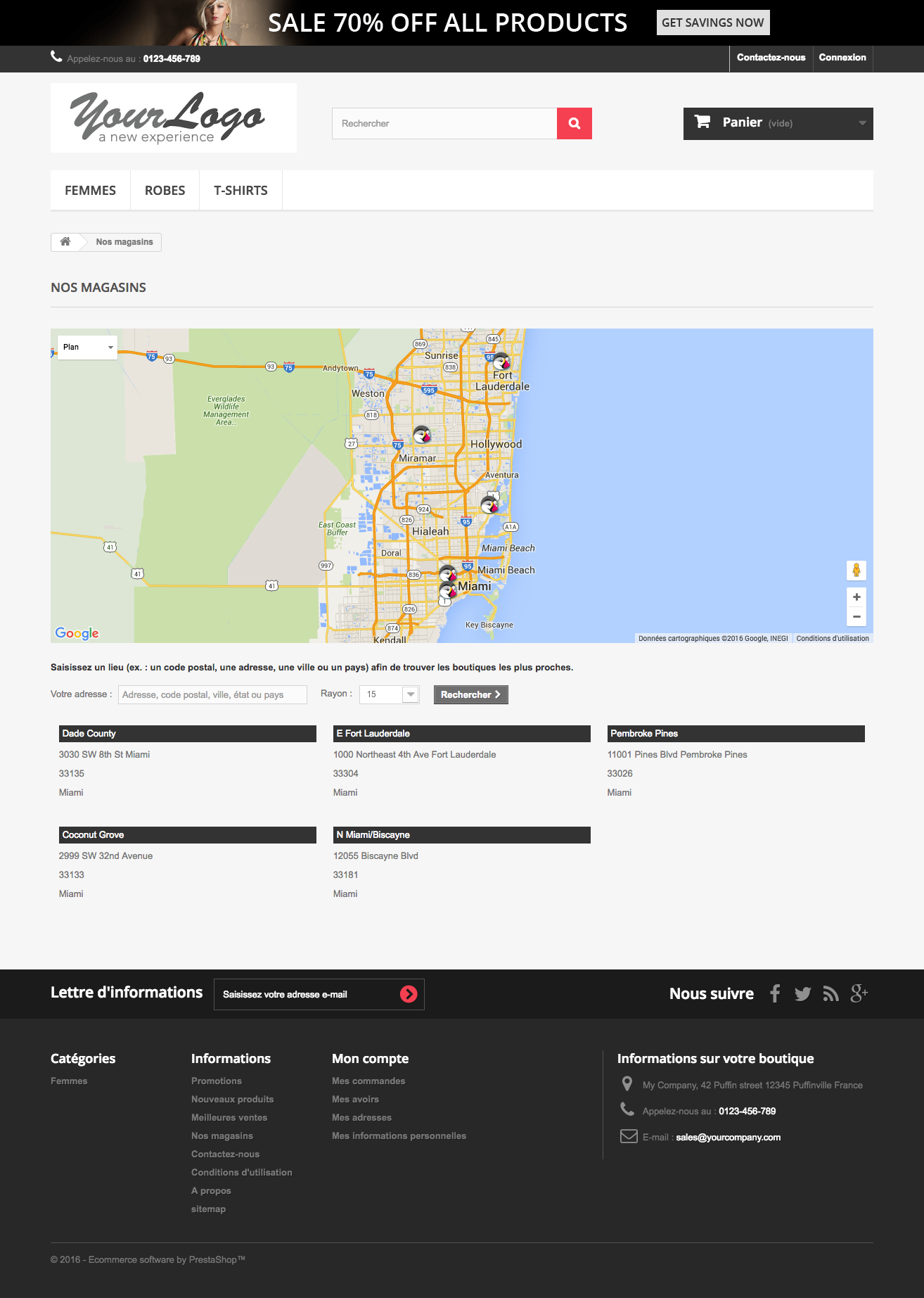
On va faire en sorte que la page magasins dans PrestaShop affiche désormais la Google map ET la liste des magasins.
On va d’abord créer un override du fichier StoresController.php qu’on va placer dans le dossier www/override/controllers/front avec le contenu suivant :

class StoresController extends StoresControllerCore
{
/**
* Assign template vars for classical stores
*/
protected function assignStores()
{
$magasins = Db::getInstance()->executeS('
SELECT s.*, cl.name country, st.iso_code state
FROM '._DB_PREFIX_.'store s
'.Shop::addSqlAssociation('store', 's').'
LEFT JOIN '._DB_PREFIX_.'country_lang cl ON (cl.id_country = s.id_country)
LEFT JOIN '._DB_PREFIX_.'state st ON (st.id_state = s.id_state)
WHERE s.active = 1 AND cl.id_lang = '.(int)$this->context->language->id);

$addresses_formated = array();

foreach ($magasins as &$magasin) {
$address = new Address();
$address->country = Country::getNameById($this->context->language->id, $magasin['id_country']);
$address->address1 = $magasin['address1'];
$address->address2 = $magasin['address2'];
$address->postcode = $magasin['postcode'];
$address->city = $magasin['city'];

$addresses_formated[$magasin['id_store']] = AddressFormat::getFormattedLayoutData($address);

$magasin['has_picture'] = file_exists(_PS_STORE_IMG_DIR_.(int)$magasin['id_store'].'.jpg');
if ($working_hours = $this->renderStoreWorkingHours($magasin)) {
$magasin['working_hours'] = $working_hours;
}
}

$this->context->smarty->assign('hasStoreIcon', file_exists(_PS_IMG_DIR_.Configuration::get('PS_STORES_ICON')));

$distance_unit = Configuration::get('PS_DISTANCE_UNIT');
if (!in_array($distance_unit, array('km', 'mi'))) {
$distance_unit = 'km';
}

$this->context->smarty->assign(array(
'distance_unit' => $distance_unit,
'simplifiedStoresDiplay' => false,
'stores' => $this->getStores(),
'magasins' => $magasins,
'addresses_formated' => $addresses_formated,
));
}
}

On va modifier le fichier d’apparence stores.tpl du thème :

{capture name=path}{l s='Our stores'}{/capture}

<h1 class="page-heading">
{l s='Our stores'}
</h1>

{if $simplifiedStoresDiplay}
{if $stores|@count}
<p class="store-title">
<strong class="dark">
{l s='Here you can find our store locations. Please feel free to contact us:'}
</strong>
</p>
<table class="table table-bordered">
<thead>
<tr>
<th class="logo">{l s='Logo'}</th>
<th class="name">{l s='Store name'}</th>
<th class="address">{l s='Store address'}</th>
<th class="store-hours">{l s='Working hours'}</th>
</tr>
</thead>
{foreach $stores as $store}
<tr class="store-small">
<td class="logo">
{if $store.has_picture}
<div class="store-image">
<img src="{$img_store_dir}{$store.id_store}-medium_default.jpg" alt="{$store.name|escape:'html':'UTF-8'}" width="{$mediumSize.width}" height="{$mediumSize.height}"/>
</div>
{/if}
</td>
<td class="name">
{$store.name|escape:'html':'UTF-8'}
</td>
<td class="address">
{assign value=$store.id_store var="id_store"}
{foreach from=$addresses_formated.$id_store.ordered name=adr_loop item=pattern}
{assign var=addressKey value=" "|explode:$pattern}
{foreach from=$addressKey item=key name="word_loop"}
<span {if isset($addresses_style[$key])} class="{$addresses_style[$key]}"{/if}>
{$addresses_formated.$id_store.formated[$key|replace:',':'']|escape:'html':'UTF-8'}
</span>
{/foreach}
{/foreach}
<br/>
{if $store.phone}<br/>{l s='Phone:'} {$store.phone|escape:'html':'UTF-8'}{/if}
{if $store.fax}<br/>{l s='Fax:'} {$store.fax|escape:'html':'UTF-8'}{/if}
{if $store.email}<br/>{l s='Email:'} {$store.email|escape:'html':'UTF-8'}{/if}
{if $store.note}<br/><br/>{$store.note|escape:'html':'UTF-8'|nl2br}{/if}
</td>
<td class="store-hours">
{if isset($store.working_hours)}{$store.working_hours}{/if}
</td>
</tr>
{/foreach}
</table>
{/if}
{else}
<div id="map"></div>
<p class="store-title">
<strong class="dark">
{l s='Enter a location (e.g. zip/postal code, address, city or country) in order to find the nearest stores.'}
</strong>
</p>
<div class="store-content">
<div class="address-input">
<label for="addressInput">{l s='Your location:'}</label>
<input class="form-control grey" type="text" name="location" id="addressInput" value="{l s='Address, zip / postal code, city, state or country'}" />
</div>
<div class="radius-input">
<label for="radiusSelect">{l s='Radius:'}</label>
<select name="radius" id="radiusSelect" class="form-control">
<option value="15">15</option>
<option value="25">25</option>
<option value="50">50</option>
<option value="100">100</option>
</select>
<img src="{$img_ps_dir}loader.gif" class="middle" alt="" id="stores_loader" />
</div>
<div>
<button name="search_locations" class="button btn btn-default button-small">
<span>
{l s='Search'}<i class="icon-chevron-right right"></i>
</span>
</button>
</div>
</div>
<div class="store-content-select selector3">
<select id="locationSelect" class="form-control">
<option>-</option>
</select>
</div>

<table id="stores-table" class="table table-bordered">
<thead>
<tr>
<th class="num">#</th>
<th>{l s='Store'}</th>
<th>{l s='Address'}</th>
<th>{l s='Distance'}</th>
</tr>
</thead>
<tbody>
</tbody>
</table>

<!-- stores -->
{*<pre>{$magasins|print_r}</pre>*}
{if $magasins|@count}
<ul id="list_stores">
{foreach $magasins as $magasin}
<li>
<p class="title">{$magasin.name|escape:'html':'UTF-8'}</p>
{assign value=$magasin.id_store var="id_store"}
{foreach f<br />
rom=$addresses_formated.$id_store.ordered name=adr_loop item=pattern}
{assign var=addressKey value=" "|explode:$pattern}
{foreach from=$addressKey item=key name="word_loop"}
<p {if isset($addresses_style[$key])} class="{$addresses_style[$key]}"{/if}>
{$addresses_formated.$id_store.formated[$key|replace:',':'']|escape:'html':'UTF-8'}
</p>
{/foreach}
{/foreach}
{if $magasin.phone}<p>{l s='Phone:'} {$magasin.phone|escape:'html':'UTF-8'}</p>{/if}
{if $magasin.fax}<p>{l s='Fax:'} {$magasin.fax|escape:'html':'UTF-8'}</p>{/if}
{if $magasin.email}<p>{l s='Email:'} {$magasin.email|escape:'html':'UTF-8'}</p>{/if}
{if $magasin.note}<p>{$magasin.note|escape:'html':'UTF-8'|nl2br}</p>{/if}
{*{if isset($magasin.working_hours)}<p>{$magasin.working_hours}</p>{/if}*}
</li>
{/foreach}
</ul>
{/if}

{strip}
{addJsDef map=''}
{addJsDef markers=array()}
{addJsDef infoWindow=''}
{addJsDef locationSelect=''}
{addJsDef defaultLat=$defaultLat}
{addJsDef defaultLong=$defaultLong}
{addJsDef hasStoreIcon=$hasStoreIcon}
{addJsDef distance_unit=$distance_unit}
{addJsDef img_store_dir=$img_store_dir}
{addJsDef img_ps_dir=$img_ps_dir}
{addJsDef searchUrl=$searchUrl}
{addJsDef logo_store=$logo_store}
{addJsDefL name=translation_1}{l s='No stores were found. Please try selecting a wider radius.' js=1}{/addJsDefL}
{addJsDefL name=translation_2}{l s='store found -- see details:' js=1}{/addJsDefL}
{addJsDefL name=translation_3}{l s='stores found -- view all results:' js=1}{/addJsDefL}
{addJsDefL name=translation_4}{l s='Phone:' js=1}{/addJsDefL}
{addJsDefL name=translation_5}{l s='Get directions' js=1}{/addJsDefL}
{addJsDefL name=translation_6}{l s='Not found' js=1}{/addJsDefL}
{/strip}
{/if}

A cela, on va ajouter un peu de style dans le fichier global.css de votre thème :

/*STORES*/
#list_stores{font-size: 0;text-align: left;}
#list_stores li{display: inline-block;vertical-align: top;width: 33.33%;padding: 0 1%;font-size: 13px;font-weight: normal;margin: 0 0 30px;}
#list_stores li .title{background: #333;color: #fff;padding: 3px 5px;}
#list_stores li p + p{margin-top: 5px;}
@media screen and (max-width: 767px){
#list_stores li{width: 48%;}
}
@media screen and (max-width: 479px){
#list_stores li{width: 98%;}
}

N’oubliez pas de supprimer le fichier www/cache/class_index.php pour que votre override soit bien pris en compte.
Le résultat devrait être sous cette forme avec une stores list précédée de la Google map avec les magasins :

Avec ça, vos clients trouveront plus facilement le point de vente qui leur correspond, un plus pour vos ventes !
[Edit du 13/06/2016] Voici les fichiers à télécharger directement pour ceux qui n’arriverait pas à mettre en place la personnalisation 🙂

Fichier StoresController.php

Fichier stores.tpl


Quitter la version mobile